 Storeboard
Storeboard/Guides/Keyword research workflow
Keyword research: from first idea to live listing
Most keyword advice stops at "find good keywords." The part that actually decides your ranking is what happens after — how a research list becomes the 160 characters you ship. Here's the whole path.
Step 1: Seeds — where keywords come from
Every keyword you'll ever rank for starts as a guess about what a stranger types. The mistake is guessing from your own vocabulary. You say "soundscape generator"; your user types "rain sounds for sleeping". Four places to harvest better guesses:
- The problem, phrased by the sufferer. Not what your app is — what it fixes. "can't sleep", "wake up tired", "insomnia help". Write ten of these before anything else.
- Your competitors' names and subtitles. The words the top ten apps in your space chose to pay 30 characters for are words they believe convert. (Their names, not their brand — never put competitor brands in your field.)
- Apple's own search suggestions. Type a seed into the App Store search box and read what it autocompletes. Those are real queries, straight from the source, for the storefront you're in.
- Your reviews (and competitors' reviews). Users describe your app in their own words right there. The phrase that recurs in five reviews is a search query.
If you're starting from a blank page, describing what your app does to an AI and asking for the terms a stranger would search is a legitimate accelerator — that's exactly what Storeboard's "Suggest from my app" does with your project description. Treat the output as seeds to score, not answers to ship.
Step 2: Score — demand vs. winnability
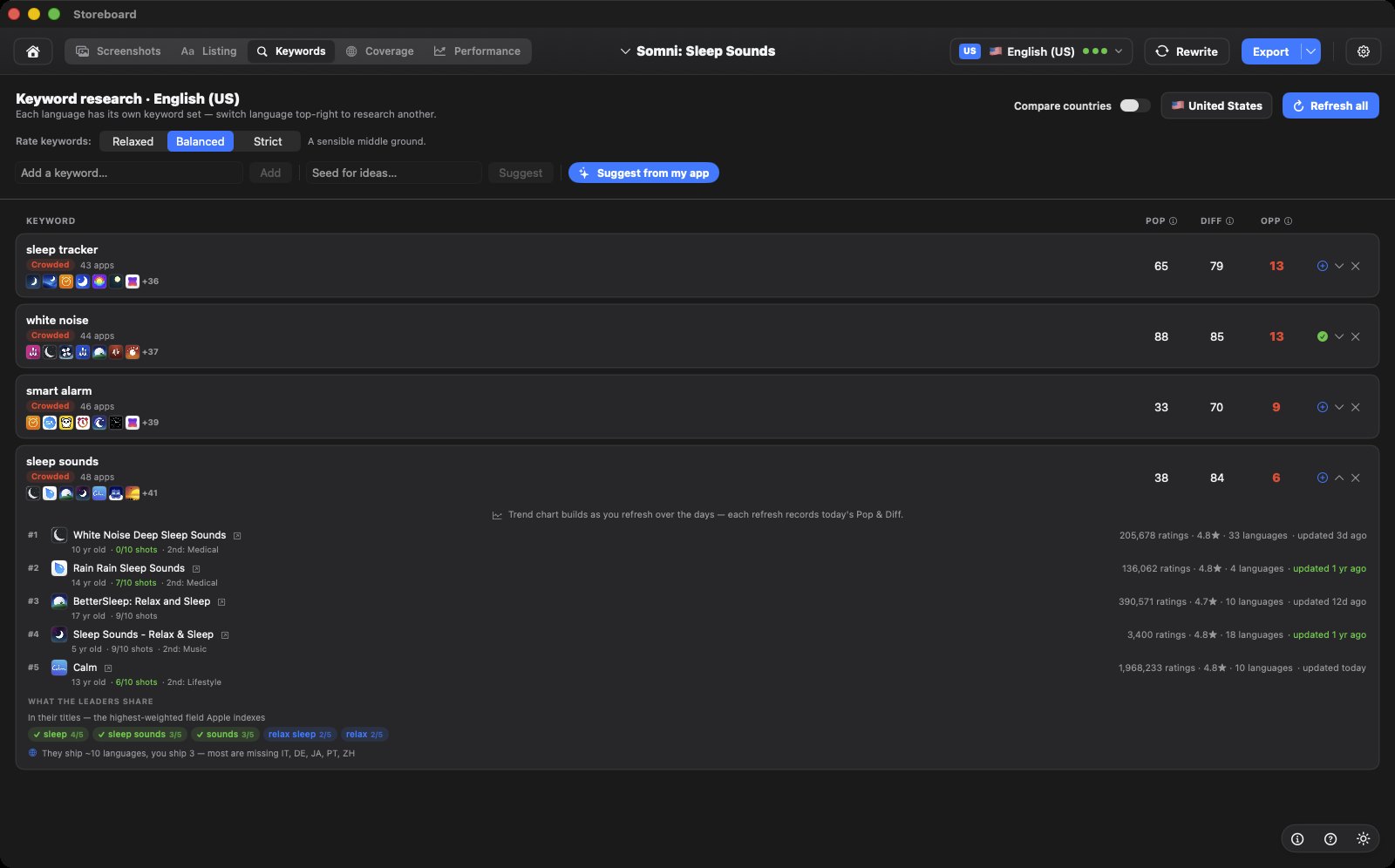
A seed list is worthless until it's ranked, and ranking needs two numbers per term:
- Popularity — is anyone actually searching this?
- Difficulty — who already ranks, and how strong are they?
Together they produce the only number you act on — Opportunity: demand you can plausibly capture. The failure modes sit at the extremes. High popularity with high difficulty is a vanity term: "fitness" gets enormous traffic and you will never see any of it from position 200. Low popularity with low difficulty is a ghost town: you'll rank #1 for a query nobody makes.
Two reading habits that separate useful research from numerology:
Look at the competitors, not just the scores. A difficulty number summarises; the app icons behind it explain. Forty-six apps on "deep sleep" tells you it's crowded. Which forty-six tells you whether they're polished incumbents with years of reviews (walk away) or thin, tired listings (take the fight).
Expect "crowded" verdicts on your whole first list. Your first seeds are usually the category's obvious words, and the obvious words are always taken. That's not failure — that's the signal to get more specific: "sleep" → "sleep stories for kids". Specificity is how small apps buy rankings.
Step 3: Ship — research becomes metadata
Here's the step most guides skip entirely. A tracked keyword list does nothing until it's placed into the three fields Apple indexes — and placement follows rules:
- The name gets your single best term (heaviest weighting), welded to your brand: "Somni: Sleep Sounds".
- The subtitle gets the next tier — benefit words that don't repeat the name. It has to persuade humans too; it's visible.
- The keyword field gets everything else: your remaining terms as single words, comma-separated, no spaces, no word that already appears in name or subtitle. Apple recombines words into phrases by itself.
This is where the "each word counts once" rule earns its keep. A 30-term research list typically compresses to 12–15 shipped words once you strip the ones your name and subtitle already cover. That compression is the actual skill — and it's mechanical enough to check automatically. Run yours through the free checker →
In Storeboard this step is one click: when you switch to a language, your tracked keywords for that country are compiled into an optimized field — deduplicated against your name and subtitle, clamped to 100 characters. The research and the shipping stay connected, which is the point: a keyword list in a spreadsheet is where ASO goes to die.
Step 4: Repeat — per country, per release
Two loops keep the work honest:
Per country. Scores are storefront-specific. "Torch" and "flashlight" aren't the same query, and neither are the competitors behind them. Research the countries you actually care about — which for English speakers means the US, UK, Australia and Canada are four separate research passes, not one. Why, and the strategy for it →
Per release. Keyword changes ship with app versions, so fold a keyword review into your release checklist. You're not redoing the research — you're checking three things: did the terms you bet on move? did a new competitor appear? is there a tracked term that now looks winnable? Fifteen minutes, every release, compounds.
Harvest what strangers actually type → score demand against winnability, per country → compress the winners into name, subtitle and field with zero repeated words → re-check every release.
The whole loop, in one native app
Suggest seeds from your app description, score them per country from Apple's public signals, and compile the winners straight into your listing — on your Mac, no subscription.
Download for MacFAQ
How many keywords should I track?
More than you can ship — 20 to 40 is a comfortable working set. The field holds about a dozen terms, so the surplus is your bench: when a shipped term goes nowhere for two releases, swap in the next candidate rather than starting research from scratch.
Where do Popularity and Difficulty numbers come from?
No tool outside Apple has real search volumes. Estimates are derived from public signals — Apple's search suggestions, autocomplete ordering, and the strength of the apps currently ranking. That's why scores are for comparing term A against term B, not for quoting as facts.
Should I chase one big keyword or several small ones?
Several small ones, almost always. Ranking third for four modest terms beats ranking fortieth for one giant — position beats volume, because nobody scrolls to page five of search results.
Do downloads affect my keyword rankings?
Yes — conversion and download velocity feed back into ranking, which is why keywords and screenshots aren't separate projects. A keyword brings the impression; the screenshots convert it; the conversion strengthens the keyword.